
Download iSavant – AI Writing Assistant, Content Generation, Text‑to‑Speech
Overview
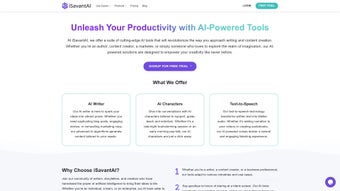
iSavant is a web‑based AI writing assistant built to supercharge the productivity of authors, marketers, and any content creator who needs high‑quality copy on a tight schedule. Powered by state‑of‑the‑art language models, iSavant offers an integrated suite of tools: an AI Writer that can produce blog posts, ad copy, or creative narratives from a brief prompt; AI Characters that act as brainstorming partners, letting users explore ideas through conversational interaction; and a Text‑to‑Speech engine that turns written material into natural‑sounding audio for videos, podcasts, or audiobooks. The platform is delivered through a clean, responsive interface that works in any modern browser, and it includes a free trial so users can evaluate the tool before committing to a subscription. Whether you are a freelance copywriter juggling multiple client briefs, a marketer launching a new campaign, or a novelist looking for fresh dialogue, iSavant promises to streamline the research, drafting, and editing phases, letting you focus on the strategic aspects of storytelling.
Core Features, Pros & Cons, and Frequently Asked Questions
Feature List
- AI Writer: Generates full‑length articles, social media posts, product descriptions, and more based on user‑defined tone, length, and keyword requirements.
- AI Characters: Interactive personas that simulate creative brainstorming sessions, helping you flesh out plot points, marketing angles, or brand voice.
- Text‑to‑Speech (TTS): Converts any block of text into lifelike audio using multiple voice options and adjustable speed settings.
- Template Library: Pre‑built frameworks for common content types such as SEO‑optimized blog outlines, email sequences, and video scripts.
- Real‑time Collaboration: Share drafts with teammates, leave comments, and watch AI suggestions update instantly.
- Plagiarism Checker: Integrated scan that ensures generated content is original and safe for publication.
- API Access: Developers can embed iSavant’s capabilities into their own platforms via RESTful endpoints.
Pros
- Highly adaptable to various writing styles and industries.
- Interactive AI Characters add a unique brainstorming layer.
- Text‑to‑Speech output is clear and customizable.
- Browser‑based, no installation required on the client side.
- Free trial provides risk‑free evaluation.
Cons
- Full feature set requires a paid subscription after the trial.
- Performance can vary on slower internet connections.
- Advanced customization (e.g., custom voice models) is not yet available.
Frequently Asked Questions
Is iSavant truly free to use?
iSavant offers a 7‑day free trial with access to all core features. After the trial, you need to choose a subscription plan to continue using the premium tools.
Which operating systems are supported?
Because iSavant runs in a web browser, it works on Windows, macOS, Linux, Android, and iOS as long as the browser meets modern standards (Chrome, Edge, Firefox, Safari).
Can I export the generated text to Word or Google Docs?
Yes. iSavant provides export options for .docx, .pdf, and direct integration with Google Drive, making it easy to move content into your preferred editing environment.
How secure is my data?
All data is transmitted over HTTPS and stored in encrypted databases. iSavant complies with GDPR and CCPA standards, ensuring your content remains private.
Is there an API for developers?
Yes, iSavant offers a RESTful API with token‑based authentication, allowing developers to integrate AI writing, character interaction, and TTS into custom applications.
Overall Rating: 4.5 / 5 – iSavant delivers a compelling blend of AI writing power, interactive brainstorming, and high‑quality voice synthesis, making it a standout tool for modern content teams.
Installation, Usage, and Compatibility
Getting started with iSavant is intentionally frictionless. Because the platform is fully web‑based, there is no traditional “installation” process. Simply navigate to www.isavant.ai, click the “Start Free Trial” button, and create an account using your email or a single‑sign‑on (SSO) provider such as Google or Microsoft. After confirming your email, you are taken directly to the dashboard where the three main modules—AI Writer, AI Characters, and Text‑to‑Speech—are displayed as tabs.
Step‑by‑step usage:
- Define your project: Choose a template or start from scratch. Fill in brief details like target audience, desired tone, keyword focus, and word count.
- Generate content: Click “Generate” and watch the AI craft a draft in seconds. You can request revisions, ask for alternative phrasing, or expand sections with follow‑up prompts.
- Brainstorm with AI Characters: Open the “Characters” tab, select a persona (e.g., “Creative Copywriter” or “Technical Editor”), and converse to refine ideas, outline structures, or test headline variations.
- Convert to audio: Move to the “Text‑to‑Speech” tab, paste or select any portion of the text, pick a voice (male, female, neutral) and language, then click “Synthesize”. Download the MP3 or embed the audio directly into video editing software.
- Export & collaborate: Use the “Export” button to save the file in .docx, .pdf, or send it straight to Google Drive. Team members can comment in real time, and all changes are saved automatically in the cloud.
Compatibility: iSavant runs on any device that supports a modern browser (Chrome 84+, Edge 85+, Firefox 78+, Safari 14+). It works seamlessly on Windows 10/11, macOS Ventura and later, Linux distributions with graphical interfaces, as well as mobile browsers on Android 9+ and iOS 13+. Because all processing occurs on iSavant’s servers, even low‑end hardware can generate complex drafts without performance lag.
For organizations with strict data residency requirements, iSavant offers an enterprise‑grade option that can be deployed within a private cloud or on‑premises via Docker containers, though this requires a custom agreement. Regular users will benefit from automatic updates; new language models and voice packs are rolled out weekly without any manual action needed.
Conclusion – Why iSavant Is Worth Your Download
In a crowded market of AI‑powered content tools, iSavant distinguishes itself by bundling three powerful capabilities—text generation, interactive brainstorming, and high‑fidelity speech synthesis—into a single, easy‑to‑use web application. The free trial lowers the barrier to entry, allowing writers to experience the speed and quality of the AI before committing financially. Its cross‑platform compatibility means you can switch between a desktop workstation and a mobile tablet without missing a beat, and the collaborative features keep teams aligned during fast‑paced campaigns.
While the subscription cost may be a consideration for freelancers on a shoestring budget, the productivity gains—measured in minutes saved per article and the ability to produce polished audio assets without hiring voice talent—often outweigh the expense. The few drawbacks, such as reliance on a stable internet connection and the absence of custom voice creation, are minor compared with the overall value proposition.
If you’re ready to accelerate your writing workflow, generate compelling copy in seconds, and add professional‑grade narration to your media, download iSavant today and start your free trial. Experience how AI can become a trusted co‑author rather than a gimmick, and watch your content output climb to new heights.






